
OpenScreen - Open source free screen recording tool for Mac and Windows.

What is OpenScreen
OpenScreen is an open source and free screen recording tool that provides users with an easy-to-use and full-featured alternative to Screen Studio. Supporting both Mac and Windows, it is completely free and follows the MIT protocol for both personal and commercial use. There are many useful features, including recording full screen or specific applications, adding manual zoom (with customizable depth and position), cropping the video, choosing a background (such as wallpaper, solid color, gradient, or a custom image), and achieving smooth panning and zooming effects. Users can add annotations (such as text, arrows, and images) and edit video clips to export videos in different resolutions and aspect ratios.
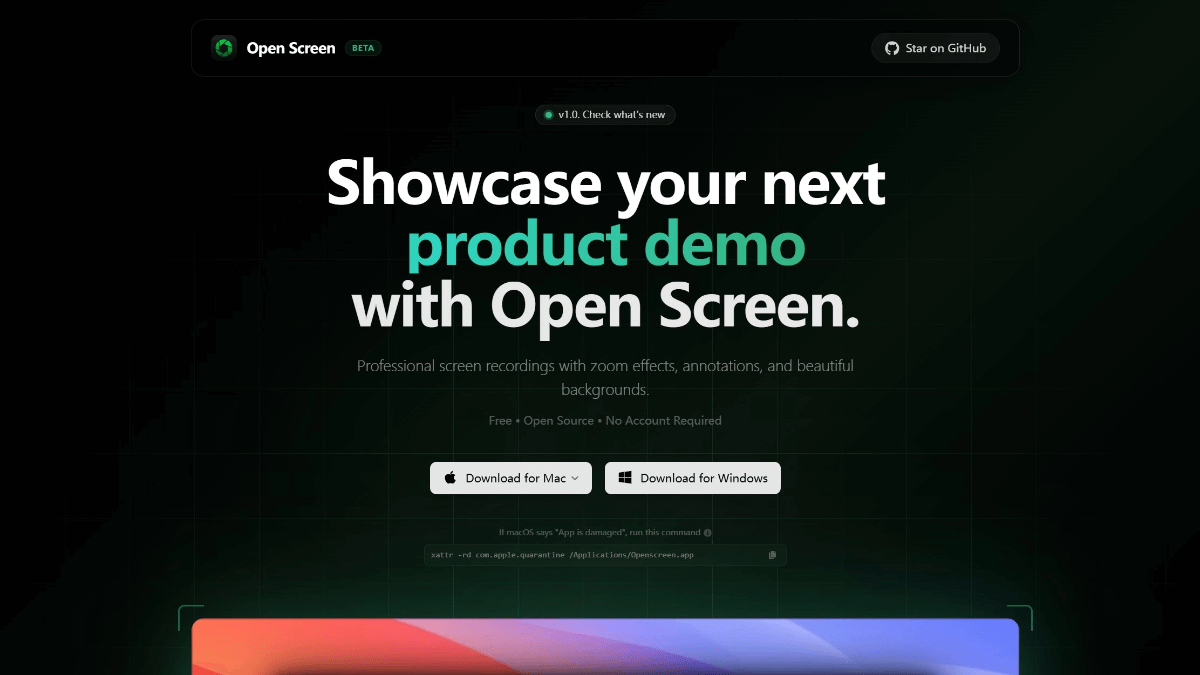
Features of OpenScreen
- screen recorder: Supports recording the whole screen or specific application windows to meet diversified recording needs.
- manual zoom: Customize the depth, duration and position of zoom to highlight key operations and details.
- Video Cropping: Allows users to crop videos, hide unwanted parts, and optimize video content.
- Background Selection: Provides a variety of background options, including solid colors, gradient colors, wallpapers or custom images to enhance the visual effect.
- Smoothing effect: Motion blur support for smooth and natural panning and zooming effects in videos.
- Note Addition: Annotations such as text, arrows, pictures, etc. can be added to facilitate labeling and explaining the video content.
- video clip: Can edit video clips, remove redundancies and streamline video content.
- export formatSupport for exporting videos with different aspect ratios and resolutions to suit a variety of playback needs.
Core Benefits of OpenScreen
- Completely free and open source: Follows the MIT protocol, has no hidden costs, can be used for personal and commercial purposes, and can be freely used, modified, and distributed by the user.
- Cross-platform supportCompatible with both Mac and Windows systems to meet the needs of different users' operating systems.
- Basic functionality is perfected: Although it is a free tool, it is equipped with key features such as recording, zooming, cropping, annotating, and so on, which meets most of the screen recording needs.
- No watermark and subscription: Unlike many free tools, OpenScreen does not add a watermark and requires no subscription for a better experience.
- simple and easy to useThe interface is simple and intuitive, so users can get started quickly without a complicated learning process.
- Highly customizable: Users can freely adjust the background, zoom effect, annotation style, etc. to create personalized video content.
- Community Support: As an open source project with an active developer community, continuous updates and improvements, users have access to technical support and communication.
What is OpenScreen's official website
- Project website:: https://openscreen.vercel.app/
- GitHub repository:: https://github.com/siddharthvaddem/openscreen
Who OpenScreen is for
- Self-media creators: For producing product demos, instructional videos, or content creation to enhance the professionalism and appeal of your videos.
- educator: Record instructional videos of course explanations, operational demonstrations, etc. to facilitate student learning and review.
- software developer: Produce software tutorials, feature demos, or documentation of the development process to facilitate team collaboration and user guidance.
- Corporate Trainer: Create internal training videos that demonstrate operational procedures or business processes to improve training efficiency.
- regular user: Record personal operation process, game video or screen sharing to meet daily recording and sharing needs.
© Copyright notes
Article copyright AI Sharing Circle All, please do not reproduce without permission.
Related posts


No comments...
 English
  简体中文
简体中文  日本語
日本語  한국어
한국어  Русский
  Español