ClipSketch AI - Open source AI video to hand-drawn split-screen tool, support B station, small red book

What is ClipSketch AI
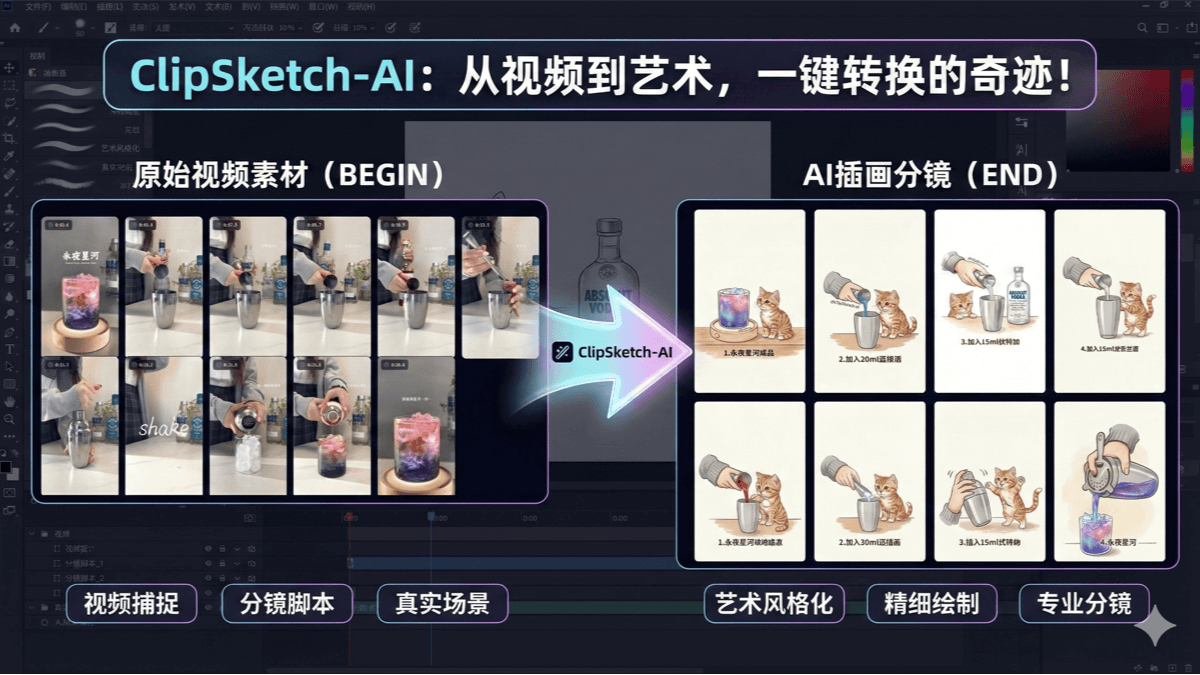
ClipSketch AI is open source video to hand-drawn split-screen tool designed for short video creators. It can convert videos from B station, Little Red Book and other platforms into hand-drawn style storyboards with one click, support for marking keyframes, automatic generation of sub-scenes and social copywriting, and can integrate user-defined roles. Tools based on Google Gemini multimodal model, need to be used with the API, applicable to tutorial disassembly, content creation and other scenarios, significantly improve the efficiency of creation. The open source project is available on GitHub, providing both local deployment and online trial.
Features of ClipSketch AI
- Video Capture and AnalysisSupport importing video links from Bilibili, Xiaohongshu and other platforms, as well as local videos and images, which can be played in HD after parsing, and are suitable for both vertical and widescreen videos.
- frame-level tagging systemThe user can accurately mark moments with shortcut keys (e.g. space to play/pause, left/right key to adjust frame by frame, T key to mark), and can export marking data to TXT timeline or ZIP image packages.
- AI-driven authoring capabilities: Based on Google Gemini Multi-modal macromodeling, transforming marker frames into hand-drawn style storyboards, automatically generating copy adapted to social media, supporting character fusion and cover generation.
- Full Platform Adaptation: Responsive interface design, perfectly adapted to PC, iPad and cell phones, mobile automatically switch layout, easy to operate.
- Batch processing and optimization: Supports batch generation and optimization of splits, configurable to use the Batch API for cost savings.
- Data export and sharing: Users can download the generated storyboard image, cover or pack all the material, able to copy the favorite copy with one click.
Core Benefits of ClipSketch AI
- Efficient Creative Process: From video capture, frame-level labeling to AI-generated hand-drawn storyboards and copy, the whole process is done in one-stop, dramatically improving creative efficiency.
- Precision frame-level operation: Supports frame-level precision marking to ensure that users can capture every moment and provide finer material for creation.
- AI Intelligent Generation: Integrate Google Gemini Big Model to generate hand-drawn style storyboards and multiple styles of social media copy in one click, lowering the threshold of creation.
- Multi-Platform Adaptation: Perfectly adapts to PC, iPad and cell phones, automatically switching layouts to meet the needs of creation on different devices.
- Flexible data export: Supports exporting TXT timeline, ZIP image packages and many other formats for users' subsequent editing and use.
- Character Fusion Function: Support for uploading custom characters or avatars, AI automatically integrates into storyboard scenes to enhance content personalization.
- batch optimization: Supports batch generation and optimization of subscripts, which can be configured to use the Batch API to save time and cost.
- Open source and free: As an open source project, users can use it free of charge, and at the same time can be based on their own needs for secondary development.
What is ClipSketch AI's official website?
- Github repository:: https://github.com/RanFeng/clipsketch-ai
Who is ClipSketch AI for?
- Video Creators: Short video creators who need to quickly extract video moments and transform them creatively for hand-drawn style video content.
- Social Media Operators: Operator responsible for content planning and posting on social media accounts, with tools to generate platform-appropriate copy and visual material.
- Content II Creative Team: Teams that are working on secondary creation of existing video content, such as producing narration, editing, etc., can efficiently extract keyframes and generate creative material.
- self-publisher: Self-media practitioners who need to quickly produce engaging graphic or video content can use the tools to boost content creativity and production efficiency.
- Animation & Illustrator: Animation or illustration creators who want to take inspiration from videos and turn them into hand-drawn style work can generate hand-drawn storyboards directly.
- Advertising and marketing staff: Teams that need to produce creative advertising content or marketing materials can quickly generate visual and copywriting content that fits their advertising needs.
© Copyright notes
Article copyright AI Sharing Circle All, please do not reproduce without permission.
Related posts

No comments...
 English
  简体中文
简体中文  日本語
日本語  한국어
한국어  Русский
  Español